 Menu
Menu
So, when I use auto keyword in VS2015 with something simple, like this:
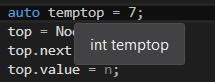
As you can see, it shows the variable's type, but, when I try something a bit more complex (or defined in another file?), it freaks out and gives me some not-so-useful information: 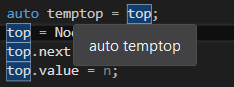
Although VS is still able to determine top's type:

So, I wonder if there is a way to make this wonderful IDE show those complex/defined somewhere else types?
 273
273
According to this discussion thread, Microsoft changed the shortcut keys.
The relevant settings are here

63
At our company, we use the Visual Assist extension (not free unfortunately, but understandably). It can find the class for the auto keyword when you choose "Goto implementation" (Alt+G).
30
If you love us? You can donate to us via Paypal or buy me a coffee so we can maintain and grow! Thank you!
Donate Us With


