Menu
Menu
The legacy vb6 application uses hardcoded connection strings like
Provider=SQLOLEDB.1;User ID=USER_NAME;password=USER_PASSWORD;Initial Catalog=DB_NAME;Data Source=OLD_SERVER_NAME;Network Library=DBMSSOCN
The goal is to forward this application to the NEW_SERVER_NAME with specific port.
I've created alias but it is not working, application continues to use old server.
However if remove part Network Library=DBMSSOCN (I did it in test application)
everything works fine.
Is there any chance to make it work with original connection string?
 350
350
DBMSSOCN refers to the network library used for the connection. In this case, TCP/IP. Aliases can be configured for Named Pipes, TCP/IP, and VIA. When you remove the DBMSSOCN setting, it falls back to Named Pipes instead of TCP/IP. Make sure of two things (both in SQL Server Configuration Manager under the 32-bit and 64-bit SQL Native Client Configuration sections):
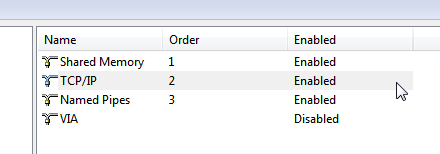
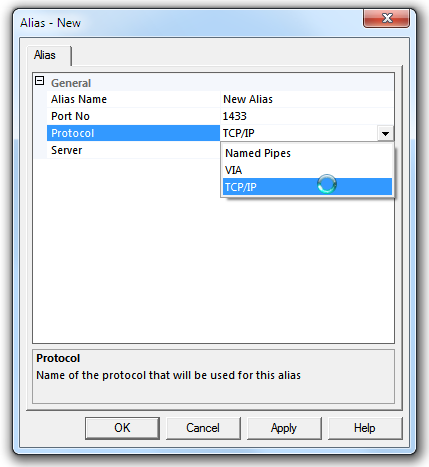
You may need to install the SQL Native Client 10.0 on the application server and change the connection string to use that version of the client before this will work. To install the new client, you'll need to install the SQL Server Tools from the installation of SQL Server 2008. The new connection string may look like the following (example is standard security from ConnectionStrings.com):
Provider=SQLNCLI10;Server=ServerAlias;Database=myDataBase;Uid=myUsername;Pwd=myPassword
cliconfg.exe which can be used to configure client alias when run on 64b machine only creates entry for 64b programs; if you don't have sql tools and want to create alias for both 32 and 64b programs create following entries in registry (below are contents of reg file with TCP alias):
Windows Registry Editor Version 5.00

[HKEY_LOCAL_MACHINE\SOFTWARE\Microsoft\MSSQLServer\Client\ConnectTo]
"oldserver\\oldinstance"="DBMSSOCN,newserver\\newinstance"

[HKEY_LOCAL_MACHINE\SOFTWARE\Wow6432Node\Microsoft\MSSQLServer\Client\ConnectTo]
"oldserver\\oldinstance"="DBMSSOCN,newserver\\newinstance"
If you love us? You can donate to us via Paypal or buy me a coffee so we can maintain and grow! Thank you!
Donate Us With