Menu
Menu
I'm a beginner R programmer attempting to plot a histogram of an insurance claims dataset with 100,000+ observations which is heavily skewed (mean=$61,000, median=$20,000, max value=$15M).
I've submitted the following code to graph the adj_unl_claim variable over the $0-$100,000 domain:
hist(test$adj_unl_claim, freq=FALSE, ylim=c(0,1), xlim=c(0,100000),
     prob=TRUE, breaks=10, col='red')
with the result being an empty graph with axes but no histogram bars - just an empty graph.
I suspect the problem is related to the skewed nature of my data, but I've tried every combination of breaks and xlim and nothing works. Any solutions are much appreciated!
 692
692
 asked Dec 07 '25 04:12
If you've set freq = FALSE, then you are getting a histogram of probability densities. These are likely much less than 1. Consequently, your histogram bars are probably printed super-tiny along the x-axis. Try again without setting the ylim, and R will automatically calculate reasonable y axis limits.
Note also that setting the xlim doesn't change the actual plot, just how much of it you see. So you might not actually see 10 breaks, if some of them fall beyond the 100000 limit in your plot. You might actually want to subset your data to exclude values over 100000 first, and then do a histogram on the reduced dataset to get the plot you want. Maybe, I'm not sure what your objective is here.
79
This might give you something to play with, using some of Tyler's suggestions.
> claim <- c(15000000, rexp(99999, rate = 1/400)^1.76)
> summary(claim)
    Min.  1st Qu.   Median     Mean  3rd Qu.     Max.
       0     4261    20080    61730    67790 15000000
>
> hs    <- 100000     # highest value to show on histogram
> br    <- 10         # number of bars to show on histogram
>
> hist(claim, xlim = c(0,hs), freq = FALSE, breaks = br*max(claim)/hs, col='red')
>
> length(claim[claim<hs]) / length(claim) #proportion of claims shown
[1] 0.82267
> sum(claim[claim<hs])    / sum(claim)    #proportion of value shown
[1] 0.3057994
where hist produced something like
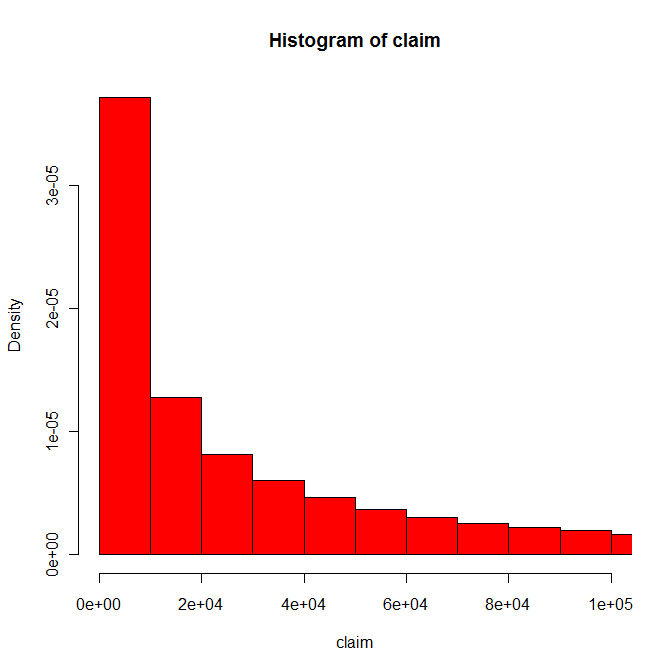
The problem with this is that although the histogram coves about 82% of the claims in this pseudo-data, it only covers about 31% of the value of the claims. So unless the only point you want to make is that most claims are small, you might want to consider a different graph.
My guess is that the real point from your data is that while most claims are fairly small, most of the cost is in the big claims. The big claims will not show up in a histogram, even if you extend the scale. Instead break the claims up into groups of differing widths, including for example 0-$1000 and $1M+, and show with a dot plot (a) what proportion of claims fall into each group and (b) what proportion of the values of claims fall into each group.
26
If you love us? You can donate to us via Paypal or buy me a coffee so we can maintain and grow! Thank you!
Donate Us With