 Menu
Menu
I have some hebrew text stored in database. When I fetch & render it in UIWebview after applying some css (setting the background color and margin for the page) the text comes up fine but the problem is that If I right align the content in webview then the Hebrew content gets right aligned but actually it is not the way it is supposed to be. I mean the way RTL text should have shown. The Full stop appears on the right hand side of the text as shown in image below. I know that right aligning the text will not show it the way RTL text should be
Its not a duplicate and I have gone through the steps mentioned there but still no go.
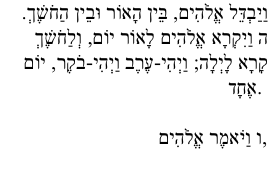
I hope if someone can help me to shown the text in correct way . I can add the CSS snippet if required. Please comment if any supporting code or image is required
 900
900
You should either set direction: rtl in the CSS or add a dir="rtl" attribute in the HTML.
You may also need to fiddle with the unicode-bidi CSS attribute as well if you're embedding this text into a mixed-language paragraph.
70
If you love us? You can donate to us via Paypal or buy me a coffee so we can maintain and grow! Thank you!
Donate Us With

