 Menu
Menu
I am wondering how to go about making a custom control for an application. So far, all that I know is how to utilize the controls that Visual Studio gives me (i.e. combobox, button, etc.). So how do I go beyond this? (I am primarily developing for Windows Phone 8)
Take for instance the gear gauges in this screenshot below :
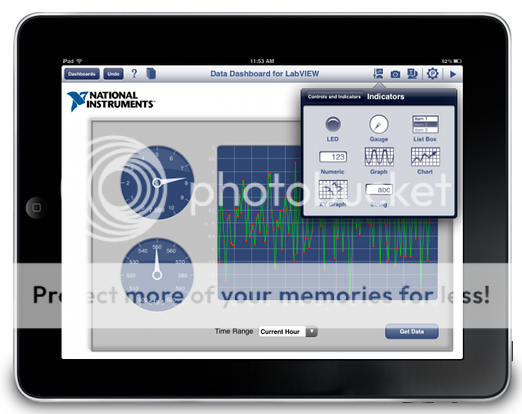
To continue with that example, how do I go about this? In OOP terms would this just be a matter of creating a "Gauge" class and making it inherit from a controls class and having the image be the gauge? What is a good resource to learn about how to go about this?
PS - I am aware the example is clearly an iOS app and I am developing with the .NET framework, I just thought it illustrated what I was trying to ask.
 462
462
First of all, do you want to develop custom controls for Windows Forms or WPF? Both scenarios offer basic Control classes which you can inherit from. I find WPF to be more versatile because it allows to separate presentation logic from business logic very easily. Furthermore, WPF's core will take care of the control's rendering whereas WinForms requires you to handle painting.
There are many resources, even free, about how to create custom user-controls. I suggest you to focus on the differences between the two environments I mentioned, pick what suits you the best and then try out even a simple tutorial on how to make a custom control like a button.
86
If you love us? You can donate to us via Paypal or buy me a coffee so we can maintain and grow! Thank you!
Donate Us With

