Menu
Menu
I have the values defining scale, skew, and translation. I would like to find the transformation matrix they represent.
How can I find the transformation matrix for these values?
I am working with values from Flash, and would like the matrix to be formatted like this, so that I can export this matrix and apply the same transformation in another language :
| a c u |
| b d v |
| 0 0 1 |
I need to be able to go from the parameters to the matrix outside of AS3/JSFL/Flash.
(Specifically I want to use C#, but I want an answer that doesn't depend on a given language.)
This link talks about how matrices work in Flash, and I understand most of it. However from what I can tell, it does not describe how to go from position/scale/skew values to a matrix. http://www.senocular.com/flash/tutorials/transformmatrix/
I know there is a .matrix property of flash display objects, but I am working with the given values outside of flash, and need to find a solution without using that.
Given the usual definitions of tranformations in Cimbali's answer, I'm still having problems with building a matrix from its skew parameter.
Here is an example set of data:
A) Object Properties (logged directly from Flash using JSFL, element.x, element.skewX, etc...)
x: 0
y: 0
scaleX: 1
scaleY: 1.0000152587890625
skewX: 19.9998779296875
skewY: 0
B) Transform Matrix (logged directly from Flash using JSFL, element.matrix)
1      | 0      | 0
-0.342 | 0.94   | 0
0      | 0      | 1
Here is what I tried:
sx = tan(19.9998779296875 * PI / 180) = tan(0.34906372) = 0.36396782164

Scale Matrix        Skew X Matrix       Result Matrix
1 | 0 | 0           1    | 0 | 0        1    | 0 | 0
0 | 1 | 0      x    0.36 | 1 | 0    =   0.36 | 1 | 0
0 | 0 | 1           0    | 0 | 0        0    | 0 | 1
SkewY is 0, so there's no reason to multiply again using a Skew Y Matrix.
So why is my Result Matrix so much different than the matrix posted by Flash?
In this example my graphic is originally 200 x 100 px. It does not inherit transformations from any parent (the parent is definitely not transformed in any way). However, when I place the graphic on the stage and ONLY change the skew X value to 20°, the Height in the properties panel changes from100 to 94px, but Scale Y stays at 100%.
In case you're not familiar with Flash IDE, when you adjust ONLY the skew X value, it does not simply push the corners of the graphic left/right. It actually makes the corners move on an arc, as you increase skew X, the parallelogram comes shorter vertically.
(I realize I have rounded some numbers, but that is only for ease of displaying them here.)
 597
597
Applying successive transformations is, for some strange reason, called "concatenating matrices" in actionscript 3, which as your link explains, and is done by multiplying matrices : read section "Matrix Multiplication" completely : it starts by defining matrix multiplications and ends litteraly by A*B -> B.concat(A);.
Note that the order in which transformations are applied is important : B*A is not A*B. In both A*B and B.concat(A);, B is applied before A. You can think of it as A*(B*(x,y,1)) thanks to the associativity of the matrix product. This is also explained in the section "Concatenated Matrices" of your link, where a child element is transformed by its matrix, and then by its parent matrix, which is shown to be equivalent to a single transformation by child_matrix.concat(parent_matrix);
However the missing piece of the puzzle is that for each operation you describe, there is a corresponding transformation matrix. They are all illustrated and explained in adobe's reference on Matrices. There is however a small mistake on the illustration of skew matrices, you should refer to this stackoverflow question instead.
Here is the illustration from the wikipedia page on the topic, which is just as clear :
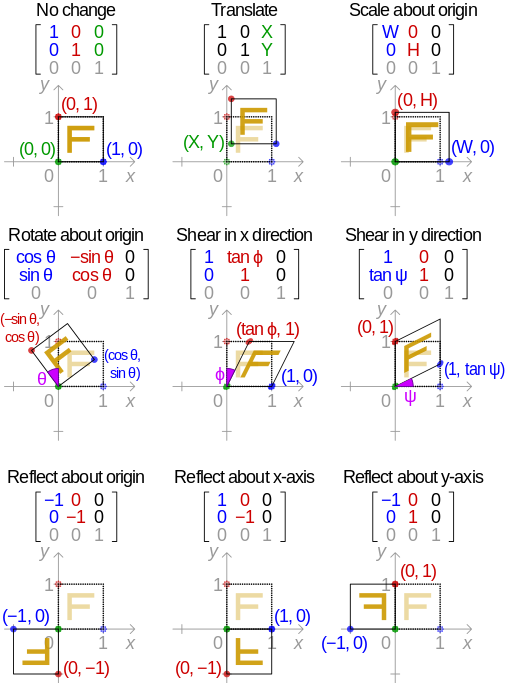
Note that all reflections can be expressed by scaling with W and/or H having -1 value. For shear expressed as angles, just use A = tan(a) in the images above.
However, it seems that flash disagrees on the meaning of "skew", and instead of preserving one coordinate while skewing the other, it preserves the lengths that were originally along that coordinate. Or, as you describe it, if you skew along X a rectangle, (some of) its vertices aren't pushed left or right, but move on an arc.
As it seems, they skew one coordinate, then correct the elongation of the figure by scaling the other coordinate. Luckily the factor by which this happens is easily predictable since we know trigonometry : it is the cosine of the angle.
So whenever you have a skewX by an angle a in flash, you have to use the following product of matrices (expressed using definitions from the image above) : matrix(scale with W=1 and H=cos(a)) * matrix(skew along x with A=-tan(a))
It would only be logical that defining a skewY in flash would yield in a reasonable programming language matrix(scale with W=cos(a) and H=1) * matrix(skew along y with B=-tan(a))
51
If you love us? You can donate to us via Paypal or buy me a coffee so we can maintain and grow! Thank you!
Donate Us With