Menu
Menu
I am facing the following problem:
I have a StatefulWidget which can generate different view in case of state change:
class _HomePageState extends State<HomePage> {
  bool _changed = false;

  @override
  Widget build(BuildContext context) {
    return changed ? View2() : View1();
  }
}
If I change a state _changed to true and hit the back button, a then the forward button, I would like my application to create fresh _HomePageState and display a View1, but currently the View2 is presented, so I believe that the state is persisted somehow.
How can I force rebuild of the widget's state?
Example app presenting the problem: link
Steps to reproduce:
GIF presenting the issue:
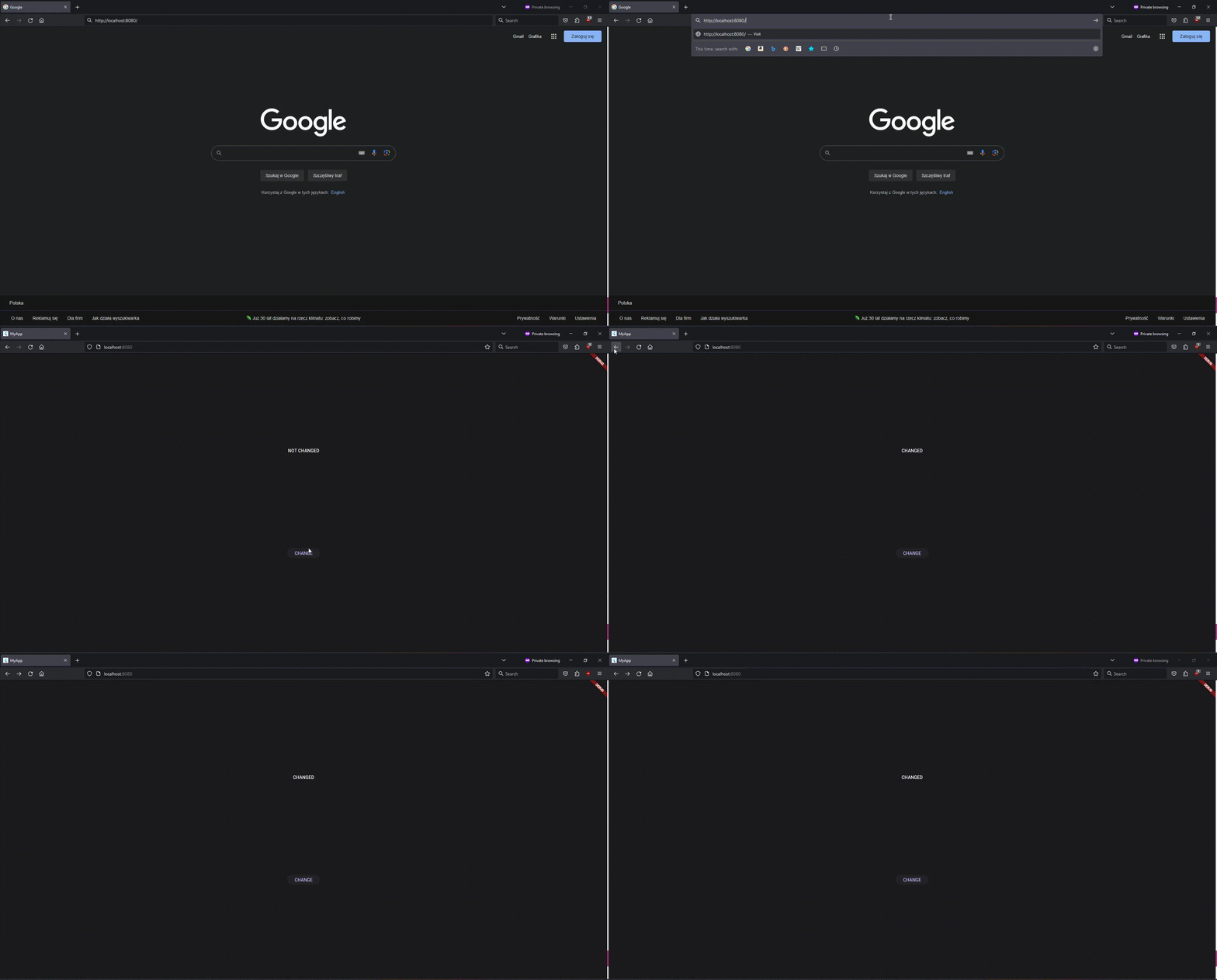
Full code which reproduces the problem:
import 'package:flutter/material.dart';

void main() => runApp(const Application());

class Application extends StatelessWidget {
  const Application({super.key});

  @override
  Widget build(BuildContext context) => const HomePage();
}

class HomePage extends StatefulWidget {
  const HomePage({super.key});

  @override
  State<HomePage> createState() => _HomePageState();
}

class _HomePageState extends State<HomePage> {
  bool _changed = false;

  @override
  Widget build(BuildContext context) {
    return Directionality(
      textDirection: TextDirection.ltr,
      child: Column(
        mainAxisAlignment: MainAxisAlignment.spaceEvenly,
        children: [
          Text(_changed ? "CHANGED" : "NOT CHANGED"),
          ElevatedButton(
            onPressed: () { setState(() { _changed = !_changed; }); },
            child: const Text("CHANGE"),
          ),
        ],
      ),
    );
  }
}
 954
954
There are a couple of ways to do that, the easiest way now is just adding a wrapper as a parent widget, that receives a callback when you press the back button from your browser, and then restart the widget.
Results:

Code:
MyParentWidget first.class MyParentWidget extends StatefulWidget {
const MyParentWidget({
super.key,
});
@override
State<MyParentWidget> createState() => _MyParentWidgetState();
}
class _MyParentWidgetState extends State<MyParentWidget> {
@override
Widget build(BuildContext context) {
return MyHomePage(
key: UniqueKey(),
onBackPressed: () {
setState(() {});
},
);
}
}
class MyHomePage extends StatefulWidget {
const MyHomePage({
required this.onBackPressed,
super.key,
});
final VoidCallback onBackPressed;
@override
State<MyHomePage> createState() {
return _MyHomePageState();
}
}
class _MyHomePageState extends State<MyHomePage> {
bool _changed = false;
@override
Widget build(BuildContext context) {
return WillPopScope(
onWillPop: () => Future(() {
widget.onBackPressed();
return false;
}),
child: Column(
mainAxisAlignment: MainAxisAlignment.spaceEvenly,
children: [
Text(
_textForCurrentState(),
style: const TextStyle(
color: Colors.black,
decoration: TextDecoration.none,
),
),
ElevatedButton(
onPressed: () {
setState(() {
_changed = !_changed;
});
},
child: const Text("CHANGE"),
),
],
),
);
}
String _textForCurrentState() {
return _changed ? "CHANGED" : "NOT CHANGED";
}
}
This only happen on release version of flutter web. Your flutter web state will be keep in navigation stack, until you do a page refresh.
Here some additional comment from flutter web issue related to Refreshing browser resets navigation stack and local variables :
When you refresh the page, the entire app is destroyed and launched again. This is how the browser works, nothing specific to Flutter here. So the values of local variables are expected to disappear.
The way navigation works today is by keeping the navigation stack in memory. This means the stack is destroyed on page refresh, and the history is lost.
Read the github complete comment here by mdebbar
27
 answered Mar 08 '26 19:03
If you love us? You can donate to us via Paypal or buy me a coffee so we can maintain and grow! Thank you!
Donate Us With