 Menu
Menu
I will input few sentences and the output will be wrap up every sentence with square bracket.I have tried so far:
  $('.addCharacter').click(function(event) {
    var textareaInput=$('.textareaInput').val();
    var myString = '[' + textareaInput + ']';
    console.log(myString);
  });
Input:
demo text one
demo text two
demo text three
Output:
[demo text one
demo text two
demo text three]
But I want output should be:
[demo text one]
[demo text two]
[demo text three]
I think it can be done with regex.I am not so good in regex.Could anyone one tell me the way?
 268
268
 asked Jan 30 '26 21:01
Replace this line
var myString = '[' + textareaInput + ']';
with
var myString = '[' + textareaInput.split("\n").join("]\n[") + ']';
If you are getting an extra space then use this regex (/\s*\n\s*/) for splitting
var myString = '[' + textareaInput.split(/\s*\n\s*/).join("]\n[") + ']';
Use replace() with regex having m(multiline) modifier
multiline; treat beginning and end characters (^ and $) as working over multiple lines (i.e., match the beginning or end of each line (delimited by \n or \r), not only the very beginning or end of the whole input string) (Taken from here )
var textareaInput = `demo text one
demo text two
demo text three`;

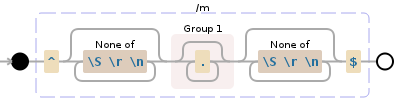
var myString = textareaInput.replace(/^[^\S\r\n]*(.*?)[^\S\r\n]*$/gm, '[$1]');

console.log(myString);Regex explanation here
Or use replace() with callback and apply trim()
var textareaInput = `demo text one
demo text two
demo text three`;

var myString = textareaInput.replace(/^.*$/gm, function(m) {
  return '[' + m.trim() + ']'
});

console.log(myString);
Using split() and join() can be do the job that approach is also added here, instead of join() using reduce() you can do something like this for fun :)
var textareaInput = `demo text one
demo text two
demo text three`;

var myString = textareaInput.split(/\n/).reduce(function(a, b) {
  return (a.length ? a + '\n' : '') + '[' + b.trim() + ']'
}, '')

console.log(myString);If you love us? You can donate to us via Paypal or buy me a coffee so we can maintain and grow! Thank you!
Donate Us With

