 Menu
Menu
UPDATE(simplified problem, removed C# from the issue)
How can I write an UPSERT that can recognize when two rows are the same in the following case...
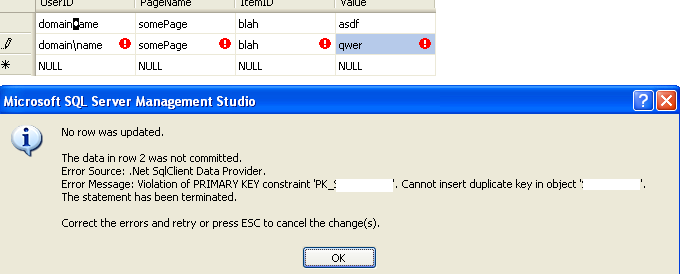
See how there's a \b [backspace] encoded there (the weird little character)? SQL sees these as the same. While my UPSERT sees this as new data and attempts an INSERT where there should be an UPDATE.
//UPSERT
    INSERT INTO [table]
    SELECT [col1] = @col1, [col2] = @col2, [col3] = @col3, [col4] = @col4
    FROM [table]
    WHERE NOT EXISTS
       -- race condition risk here?
       ( SELECT 1 FROM [table]
       WHERE
            [col1] = @col1
        AND [col2] = @col2
        AND [col3] = @col3)

    UPDATE [table]
        SET [col4] = @col4
        WHERE
        [col1] = @col1
        AND [col2] = @col2
        AND [col3] = @col3
 908
908
You need the @ sign, otherwise a C# character escape sequence is hit.
C# defines the following character escape sequences:
\' - single quote, needed for character literals
\" - double quote, needed for string literals
\\ - backslash
\0 - Unicode character 0
\a - Alert (character 7)
\b - Backspace (character 8)
\f - Form feed (character 12)
\n - New line (character 10)
\r - Carriage return (character 13)
\t - Horizontal tab (character 9)
\v - Vertical quote (character 11)
\uxxxx - Unicode escape sequence for character with hex value xxxx
\xn[n][n][n] - Unicode escape sequence for character with hex value nnnn (variable length version of \uxxxx)
\Uxxxxxxxx - Unicode escape sequence for character with hex value xxxxxxxx (for generating surrogates)
After hours of tinkering it turns out I've been on a wild goose chase. The problem is very simple. I pulled my UPSERT from a popular SO post. The code is no good. The select will sometimes return > 1 rows on INSERT. Thereby attempting to insert a row, then insert the same row again.
The fix is to remove FROM
    //UPSERT
    INSERT INTO [table]
    SELECT [col1] = @col1, [col2] = @col2, [col3] = @col3, [col4] = @col4
    --FROM [table] (Dont use FROM..not a race condition, just a bad SELECT)
    WHERE NOT EXISTS
       ( SELECT 1 FROM [table]
       WHERE
            [col1] = @col1
        AND [col2] = @col2
        AND [col3] = @col3)

    UPDATE [table]
        SET [col4] = @col4
        WHERE
        [col1] = @col1
        AND [col2] = @col2
        AND [col3] = @col3
Problem is gone.
Thanks to all of you.
28
If you love us? You can donate to us via Paypal or buy me a coffee so we can maintain and grow! Thank you!
Donate Us With

