 Menu
Menu
I'm trying to create a list in Android in which each item has one ore more action buttons, as it's shown here with the number 2:
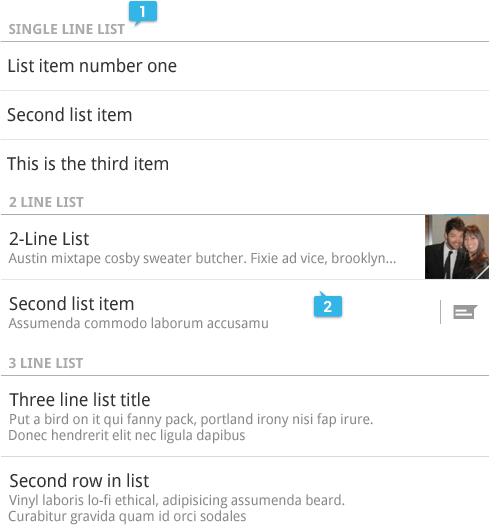
Is there any predefined way or template to do this, or do I have to manually create the views for the items in the list with their separators, action buttons and everything? (if that is the case, I would also appreciate some help with it :))
Thanks!
 975
975
You'll have to create your own layout for the rows. (You shouldn't need to do the separators.)
I do this in one of my apps. Here's one of the layouts I use for my items:
<?xml version="1.0" encoding="utf-8"?>
<RelativeLayout xmlns:android="http://schemas.android.com/apk/res/android"
    android:layout_width="match_parent"
    android:layout_height="match_parent">

    <ImageView
        android:id="@+id/icon"
        android:layout_width="wrap_content"
        android:layout_height="wrap_content"
        android:layout_alignParentLeft="true"
        android:layout_alignParentTop="true"
        android:contentDescription="@string/contentDescription_itemIcon"
        android:src="@drawable/album_placeholder" />

    <Button
        android:id="@+id/playButton"
        android:layout_width="40dp"
        android:layout_height="40dp"
        android:layout_alignParentRight="true"
        android:layout_alignParentTop="true"
        android:focusable="false"
        android:focusableInTouchMode="false" />

    <Button
        android:id="@+id/queueButton"
        android:layout_width="40dp"
        android:layout_height="40dp"
        android:layout_alignParentTop="true"
        android:layout_toLeftOf="@id/playButton"
        android:focusable="false"
        android:focusableInTouchMode="false" />

    <TextView
        android:id="@+id/mainText"
        android:layout_width="wrap_content"
        android:layout_height="wrap_content"
        android:layout_alignParentTop="true"
        android:layout_marginLeft="4dp"
        android:layout_toLeftOf="@id/queueButton"
        android:layout_toRightOf="@id/icon"
        android:text="@string/placeholder_mainText" />

    <TextView
        android:id="@+id/rightAdditionalText"
        android:layout_width="wrap_content"
        android:layout_height="wrap_content"
        android:layout_alignBaseline="@id/leftAdditionalText"
        android:layout_marginRight="4dp"
        android:layout_toLeftOf="@id/queueButton"
        android:text="@string/placeholder_rightText" />

    <TextView
        android:id="@+id/leftAdditionalText"
        android:layout_width="wrap_content"
        android:layout_height="wrap_content"
        android:layout_alignLeft="@id/mainText"
        android:layout_below="@id/mainText"
        android:layout_marginTop="0dp"
        android:layout_toLeftOf="@id/rightAdditionalText"
        android:text="@string/placeholder_leftText" />

</RelativeLayout>
Here's the adapter I use:
private class ItemAdapter extends ArrayAdapter<T> {
    private int rowLayoutId;

    public ItemAdapter(Context context, int rowLayoutId, T[] items) {
        super(context, 0, items);
        this.rowLayoutId = rowLayoutId;
    }

    @Override
    public View getView(int position, View convertView, ViewGroup parent) {
        View v = convertView;
        if (v == null) {
            LayoutInflater vi = (LayoutInflater)getContext().getSystemService(Context.LAYOUT_INFLATER_SERVICE);
            v = vi.inflate(rowLayoutId, null);
            v.findViewById(R.id.queueButton).setOnClickListener(onQueueButtonClicked);
            v.findViewById(R.id.playButton).setOnClickListener(onPlayButtonClicked);
        }

        T item = getItem(position);
        if (item != null) {
            setText(v, R.id.mainText, item.name);
            fillRowView(v, item);
        }
        v.setTag(item);
        return v;
    }
}
Mine is parameterized with the row layout id for all items, but you may want to do that differently. The setText() and fillRowView() functions are helpers defined in the containing class.
Note that I set the item object into the row view's tag, so I can get it later in the button click handler:
View.OnClickListener onPlayButtonClicked = new View.OnClickListener() {
    @Override
    public void onClick(View button) {
        View listItem = (View)button.getParent();
        Object tag = listItem.getTag();
        try {
            @SuppressWarnings("unchecked")
            T item = (T)tag;
            // do someting with item
        }
        catch (ClassCastException e) {
        }
    }
};
You can see what this looks like here
158
If you love us? You can donate to us via Paypal or buy me a coffee so we can maintain and grow! Thank you!
Donate Us With

