Menu
Menu
I'm playing around setting up my own java http server to better understand http servers and what goes on under the hood of the web. I've developed a pretty simple server and have been able to serve both html pages as well as data in JSON form. Then I saw the browser (I'm using chrome but assuming it's the same for others) was sending a request for favicon.ico. I'm able to identify that request on my server, so I'm trying to serve up a random icon I downloaded and resized to 16x16 pixels in png format, as that's what the internet says the size needs to be. Here's my code, note it's not supposed to be anything professional, just something that will work for my basic educational purposes:
[set up ServerSocket and listen]
public static String err_header = "HTTP/1.1 500 ERR\nAccess-Control-Allow-Origin: *";
public static String success_header = "HTTP/1.1 200 OK\nAccess-Control-Allow-Origin: *";
public static String end_header = "\r\n\r\n";
while(true){
        try{
            System.out.println("Listening for new connections");
            clientSocket = server.accept();
            System.out.println("Connection established");
            InputStreamReader isr = new InputStreamReader(clientSocket.getInputStream());
            BufferedReader reader = new BufferedReader(isr);
            String getLine = reader.readLine();//first line of HTTP request
            handleRequest(getLine,clientSocket);
        }//end of try
        catch(Exception e){
            [error stuff]
        }//end of catch
    }//end of while
HandleRequest method:
public static void handleRequest(String getLine,Socket clientSocket) throws Exception{
    if(getLine.substring(5,16).equals("favicon.ico")){
        List<String> iconTag = new ArrayList<String>();
        iconTag.add("\nContent-Type: image/png");
        handleFileRequest("[file]",iconTag,clientSocket);
    }//end of if
    else{
        handleFileRequest("[file]",clientSocket);
    }//end of else
}//end of handleRequest
handleFileRequest for images:
public static void handleFileRequest(String fileName,List<String> headerTags,Socket clientSocket) throws Exception{
    OutputStream out = clientSocket.getOutputStream();
    BufferedReader read = new BufferedReader(new FileReader(fileName));
    out.write(success_header.getBytes("UTF-8"));
    Iterator<String> itr = headerTags.iterator();
    while(itr.hasNext()){
        out.write(itr.next().getBytes("UTF-8"));
    }//end of while
    out.write(end_header.getBytes("UTF-8"));
    String readLine = "";
    while((readLine = read.readLine())!=null){
        out.write(readLine.getBytes("UTF-8"));
    }//end of while
    out.flush();
    out.close();
}//end of handleFileRequest
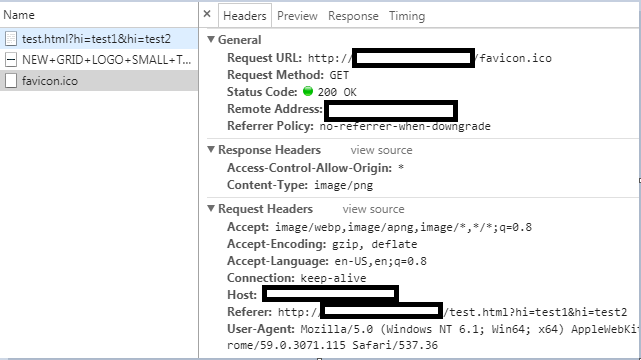
And it appears to work, as the server sends the file, the browser shows the 200 OK response, but there's no favicon and when I filter network requests to just images, there is one image requested by the page being served but the favicon request is not listed there (the favicon request is in the "other" section). Similarly when clicking on the other image the image shows up on the preview, whereas that's not the case with the favicon request. Screenshot:
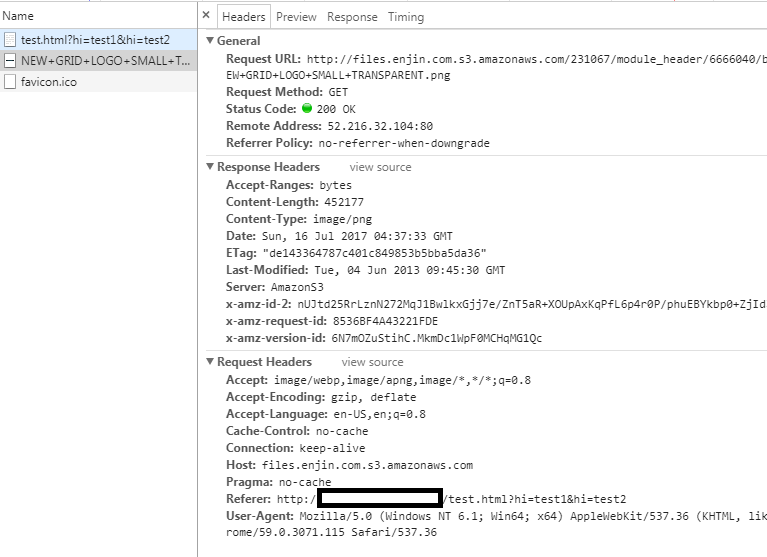
Meanwhile here's what the other image looks like, and it shows up in the page just fine:
I also tried including the Content-Length header, but that didn't seem to make a difference. Am I missing something obvious?
Also just to clarify, I know I can include the favicon in the actual html page, the goal isn't to do it, but to understand how it works.
 935
935
It seems the content of the favicon is not served correctly.
I suspect this is most likely due to the way you read its content:
while((readLine = read.readLine())!=null){
    out.write(readLine.getBytes("UTF-8"));
}
Reading binary content line by line is inappropriate,
because the concept of lines, and also UTF-8 encoding,
don't make sense in the context of binary files.
And you cannot read binary content correctly line by line this way,
because the readLine method of a BufferedReader doesn't return the full line, because it strips the newline from the end.
You cannot manually add a newline character because you cannot know what exactly it was.
Here's a simpler and correct way to read the content of a binary file:
byte[] bytes = Files.readAllBytes(Paths.get("/path/to/file"));
Once you have this, it's easy to produce a correct file header with the content length, using the value of bytes.length.
It seems it will be good for you if we clarify a few things.
When you open a URL in a browser, the browser sends a GET request to the web server to download the content of the original URL that you have specified.
Once it has the page content, it will send further GET requests:
SERVERNAME/favicon.ico by defaultsrc attribute of any (valid) <img/> tags in the documenthref attribute of any (valid) <style/> tags in the document<script/> tags, and so on...The favicon is purely cosmetic, to show in browser tab titles, the other resources are essential for rendering a page. They are not essential in text-based browsers like lynx, such browsers will obviously not fetch these resources.
This is the explanation for why the favicon is requested, and how.
In the most basic case, serving a file has two important components:
Produce an appropriate HTTP header: each line in the header is in name: value format, and each line must end with \n.
There must be at least a Content-type header.
The header must be terminated by a blank line.
After the blank line that terminates the header,
the content can be anything, even binary.
To illustrate with an example,
consider the curl command, which dumps the content of a url to standard output.
If you run curl url-to-some-html-file,
you will see the content of the html file.
If you run curl url-to-some-image-file,
you will see the content of the image file.
It will be unreadable, and your terminal will probably make funny noises.
You can redirect the output to a file with curl url-to-some-image-file > image.png,
and that will give you an image file,
binary content,
that you can open in any image viewer tool.
In short, serving files is really just printing a header on stdout,
then printing a blank line to terminate the header,
then printing the content on stdout.
An easy way to debug that an image is correctly served is to save the URL to a file using curl,
and then verify that the saved file and the original file are identical,
for example using the cmp command:
curl -o file url-to-favicon
cmp file /path/to/original
The output of cmp should be empty.
This command only produces output if it finds a difference in the two files.
Instead of using a ServerSocket,
here's a drastically simpler way to implement an HTTP server:
HttpServer server = HttpServer.create(new InetSocketAddress(1234), 0);

server.createContext("/favicon.ico", t -> {
  byte[] bytes = Files.readAllBytes(Paths.get("/path/to/favicon"));
  t.sendResponseHeaders(200, bytes.length);
  try (OutputStream os = t.getResponseBody()) {
    os.write(bytes);
  }
});

server.createContext("/", t -> {
  Charset charset = StandardCharsets.UTF_8;
  List<String> lines = Files.readAllLines(Paths.get("/path/to/index"), charset);

  t.sendResponseHeaders(200, 0);

  try (OutputStream os = t.getResponseBody()) {
    for (String line : lines) {
      os.write((line + "\n").getBytes(charset));
    }
  }
});

server.start();
If you love us? You can donate to us via Paypal or buy me a coffee so we can maintain and grow! Thank you!
Donate Us With