 Menu
Menu
I am trying to create TopBar navigator (Which has already been created and works fine) and I want it to use Poppins as a font and then use this color #00BB23 for its selected tab bar for some reason, what i did does not seem to work as the screenshot is looking like this

My code is looking thus :
import {createMaterialTopTabNavigator} from '@react-navigation/material-top-tabs';
import LocalPayments from '../src/LocalPayments';
import InternationalPayments from '../src/InternationalPayments';

const Tab = createMaterialTopTabNavigator();

function TopNavigation() {
  return (
    <Tab.Navigator
      initialRouteName="Local Payments"
      tabBarOptions={{
        activeTintColor: '#00BB23',
        labelStyle: {fontSize: 12},
        style: {backgroundColor: 'white'},
      }}>
      <Tab.Screen
        name="Local Payments"
        component={LocalPayments}
        options={{tabBarLabel: 'Local Payments'}}
      />
      <Tab.Screen
        name="International Payments"
        component={InternationalPayments}
        options={{tabBarLabel: 'International Payments'}}
      />
    </Tab.Navigator>
  );
}

export default TopNavigation;
Please what do I do in this case?
 434
434
 asked Dec 21 '25 21:12
I got it to work. Just some look ups on github / react native sources gave me an edge to what i wanted to see and get.
Code looks like this now
import {createMaterialTopTabNavigator} from '@react-navigation/material-top-tabs';
import LocalPayments from '../src/LocalPayments';
import InternationalPayments from '../src/InternationalPayments';

const Tab = createMaterialTopTabNavigator();

function TopNavigation() {
  return (
    <Tab.Navigator
      initialRouteName="Local Payments"
      screenOptions={{
        tabBarPosition: 'top',
        tabBarIndicatorStyle: {
          backgroundColor: '#00BB23',
          height : 3
        },
        tabBarLabelStyle: {
          fontWeight: '240',
          fontFamily: 'Poppins-Bold',
        },
      }}>
      <Tab.Screen
        name="Local Payments"
        component={LocalPayments}
        options={{tabBarLabel: 'Local Payments'}}
      />
      <Tab.Screen
        name="Intl. Payments"
        component={InternationalPayments}
        options={{tabBarLabel: 'Intl. Payments'}}
      />
    </Tab.Navigator>
  );
}

export default TopNavigation;
And the image looks thus :
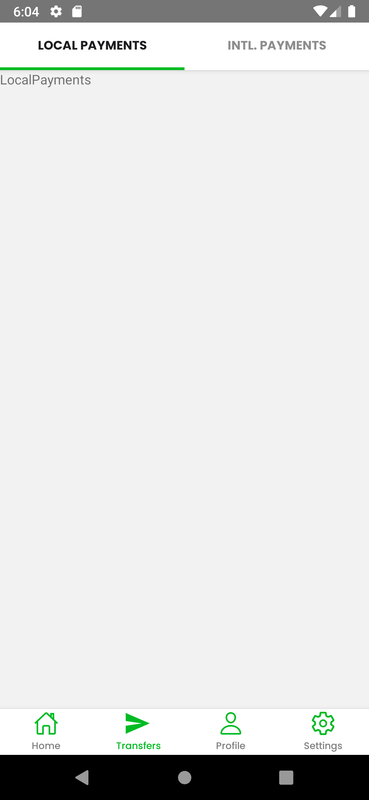
So thanks everyone, hopefully it would help someone someday!
78
answered Dec 24 '25 10:12
If you love us? You can donate to us via Paypal or buy me a coffee so we can maintain and grow! Thank you!
Donate Us With