 Menu
Menu
I have binded DataTable to DataGridView (in WinForms) and i'd like to change how columns are formatted in GUI.
However, if i manually add columns to DataGridView and set errorsGrid.AutoGenerateColumns = false, data doesn't appear in those columns (rows are added however). So is there any way to bind DataTable and change eg. width of column in DataGridView? With AutoGenerateColumns = false bindings like BingingList are added to existing columns, but DataTable doesn't seem to work that way.
 317
317
Please tell have you specified DataPropertyName attribute for each of columns you have added manually on Edit Columns form for your grid (as on screenshot below)?
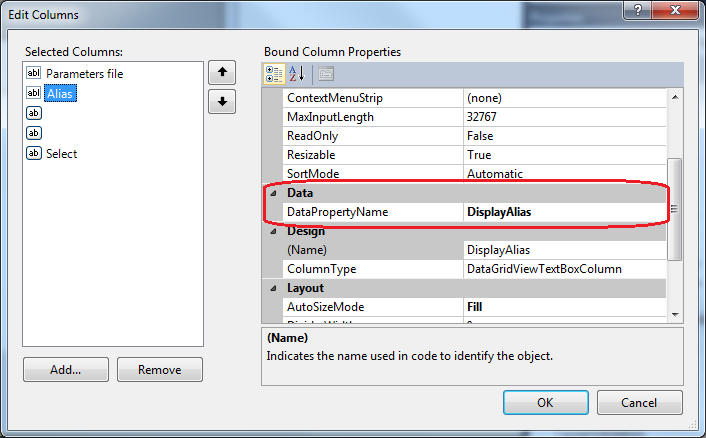
Looks like you need to specify binding to table columns explicitly for each of your grid columns on form Edit Columns which is invoked by right-click menu item Edit Columns... for grid view in form editor. You need to configure data binding for each column manually, as you have specified grid's property errorsGrid.AutoGenerateColumns = false (which means columns with bidings to table fields will not be generated automatically). As grid contains empty rows - you can be sure that data is loaded successfully, and the only thing which remains to do - is to configure way how rows are displayed in the grid.
91
If you love us? You can donate to us via Paypal or buy me a coffee so we can maintain and grow! Thank you!
Donate Us With

