Menu
Menu
When git shows the diff between two versions, it has the ability to show sections that have moved (as opposed to just added or removed) in a particular color, using the colorMoved = default config option.
In Visual Studio Code the command Git: Open Changes seems to ignore this option. Is it possible to make Code show what lines have moved?
I've looked at the color settings in https://code.visualstudio.com/api/references/theme-color#diff-editor-colors but couldn't find anything there.
 927
927
Update: It has been now implemented. For more information see Starball's post .
Previous answer:
It is simply not implemented (which can change in the future). If you check the source code it is not mentioned anywhere.
Here is the code which colors the diff editor colors.
101
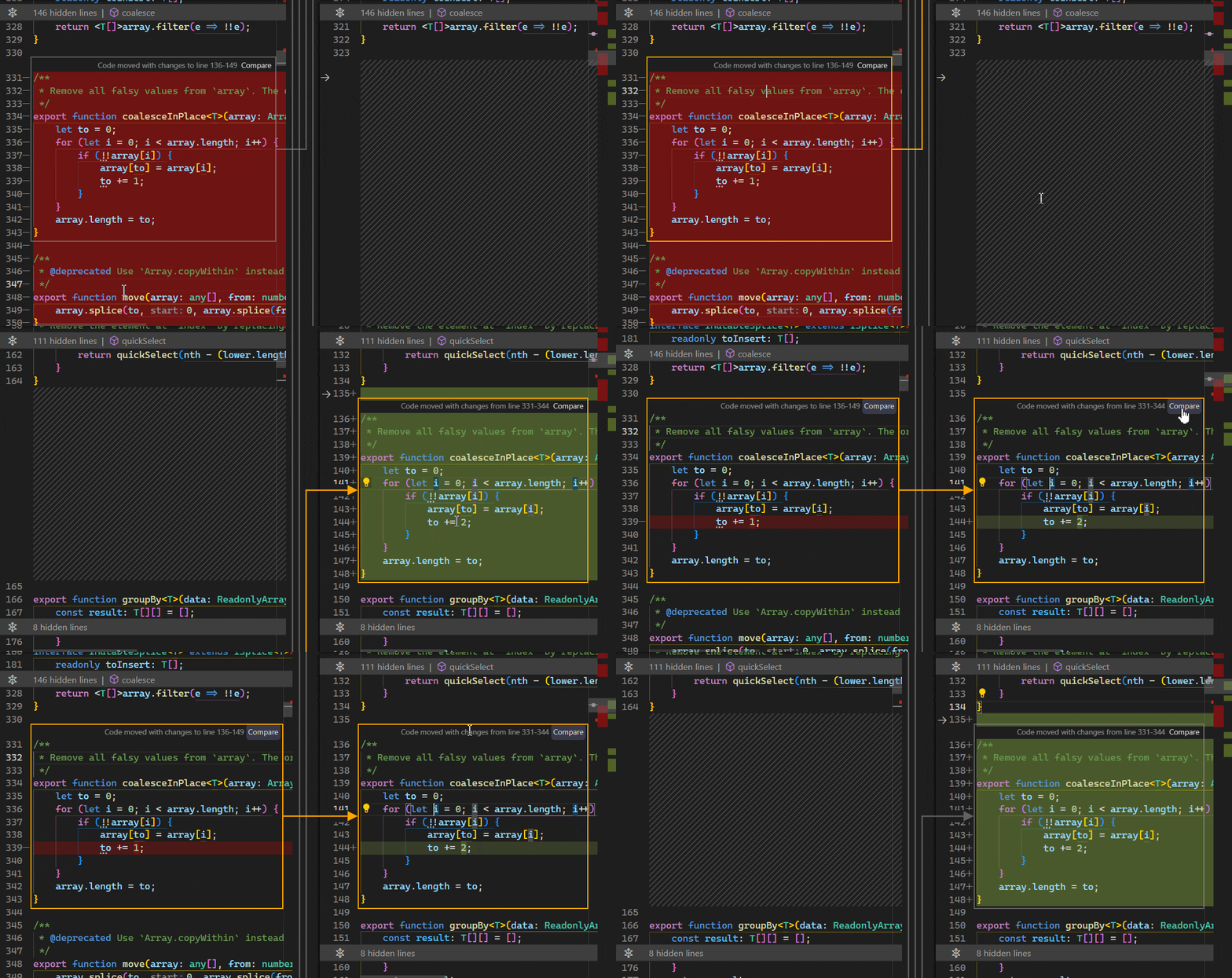
In VS Code 1.82, you can opt into the new experimental moved code detection by setting diffEditor.experimental.showMoves to true in your settings. Quoting from the 1.82 release notes:
When enabled, code blocks that are moved from one location to a different location in the same file are detected and arrows are drawn to indicate where the code blocks moved to.
Code moves are also detected when they are slightly modified. The Compare button can be used to compare the block before and after the move.
42
 answered Apr 27 '26 17:04
If you love us? You can donate to us via Paypal or buy me a coffee so we can maintain and grow! Thank you!
Donate Us With