Menu
Menu
I have configured two build configurations in my solution file like so:
Global
    GlobalSection(SolutionConfigurationPlatforms) = preSolution
        Debug|Any CPU = Debug|Any CPU
        Release|Any CPU = Release|Any CPU
    EndGlobalSection
In the old Rider UI, it was really easy to switch between the two:
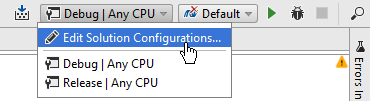
Screenshot is from the official documentation: https://www.jetbrains.com/help/rider/Build_Configurations.html#solution
However, since turning on the in the new UI (which is still in Beta right now), this dropdown is missing and I can't find a way to change the build configuration. How can I do this?
 312
312
Go to Build → Change Solution configuration...:

In the following dialog, you can choose the build configuration:

You can also click Show Configuration on Toolbar to bring it back to the toolbar.
Edit: With the latest version of Rider 2023.1 (tested with Build #RD-231.8109.212, built on April 4, 2023), the toolbar now shows up as expected:

191
If you love us? You can donate to us via Paypal or buy me a coffee so we can maintain and grow! Thank you!
Donate Us With