Menu
Menu
I cannot understand the way GDI+ is drawing line on a surface, may be it has some algorithm to do it.
For ex. lets take a surface 10x10 px.
Bitmap img = new Bitmap(10, 10);
Now lets draw a line on this surface, with width 5px and top offset 5px.
  using (var g = Graphics.FromImage(img))
     {
        g.Clear(Color.White);
        var pen = new Pen(Color.Brown);
        pen.Width = 5;
        g.DrawLine(pen, 0F, 5F, 10F,  5F);
     }
We will get:
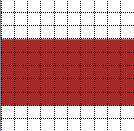
The drawing didn't begin at pixel #5, it began from pixel #4. It is obvious, that the start point is calculated separately. But how?
I've tried to get a regularity, and got this:
y = offset + width/2 - 1
where y is real start point y, offset is selected start point y.
But in some cases this doesn't work. For example, lets take width=6, selected top offset = 0, we will get y=2, and it will be drawn this way:
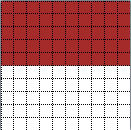
It must show 6 pixels but it didn't.
So there must be more general algorythm for selecting the start point, but I really have no idea aboit what it can be. Any help appreciated.
 245
245
There is no offset in the line drawing. The co-ordinates you specify in the DrawLine method define the centre of the line. The top pixel is y - width / 2 and the bottom is y - width / 2 + width - 1. That second formula takes into account the fact that width / 2 is rounded down. Also, the top line is y = 0 and the bottom line is y = 9. So, for you first line:
top = 5 - (5 / 2) = 3
bottom = 5 - (5 / 2) + 5 - 1 = 7
and the second line:
top = 2 - (6 / 2) = -1
bottom = 2 - (6 / 2) + 6 - 1 = 4
The top edge is clipped to the edge of the bitmap so the line width is reduced.
121
In the first example, it looks like a line with a width of 5 pixels, centered on row 5 (counting starts at 0, not 1). This seems like a reasonable outcome.
In the second example, it looks like a line of width 6, centered between rows 1 and 2, where the top row is cut off, because it extends beyond the borders of the image.
34
If you love us? You can donate to us via Paypal or buy me a coffee so we can maintain and grow! Thank you!
Donate Us With