Menu
Menu
I'm trying to make my Legends fit on my graph. Somehow, the "left" CSS attribute gets set to "244" when the graph is created. I need it to be much smaller, so that the legend will start more to the left, leaving room for the text of the Legend.
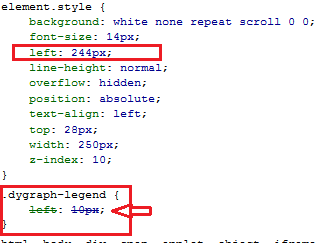
I defined ".dygraph-legend" as instructed in the docs, and sure enough, the style gets applied, but the "left" attribute apparently gets overwritten at runtime by the Dygraph object itself.
(See image below showing how the style is applied, then overwritten).
Is there an option or different CSS property that I can set so that my legend will fit, or do I have to set it at runtime with JavaScript?
 814
814
Try adding !important:
.dygraph-legend {
  left: 244px !important;
}
See here for an example.
The fact that you have to use !important is unfortunate and something that will hopefully be fixed when dygraphs comes with a separate CSS file in the 2.0 release.
121
If you love us? You can donate to us via Paypal or buy me a coffee so we can maintain and grow! Thank you!
Donate Us With