 Menu
Menu
I'm creating an Universal app and I have to create custom safe zones on the map view.
What I do is:
UIView as superview of map view called squareZone. squareZone view I add UIPanGestureRecognizer, UIPinchGestureRecognizer and UIRotationGestureRecognizer so I can move, rotate and zoom (in and out).Here is the code of SquareZone
- (id)initWithFrame:(CGRect)frame{
    self = [super initWithFrame:frame];
    if (self) {
        self.opaque = NO;
        self.layer.cornerRadius = 5.0f;
    }
    return self;
}

- (void)drawRect:(CGRect)rect {
    [super drawRect:rect];

    UIColor *color = [UIColor colorWithRed: 0.765 green: 0.439 blue: 0.443 alpha: 0.658];

    UIBezierPath *rectanglePath = [UIBezierPath bezierPathWithRect: rect];
    [color setFill];
    [rectanglePath fill];
    [UIColor.whiteColor setStroke];
    rectanglePath.lineWidth = 5;
    CGFloat rectanglePattern[] = {2, 3};
    [rectanglePath setLineDash: rectanglePattern count: 2 phase: 0];
    [rectanglePath stroke];
}

Now, when the user adjust the squareZone I have to show on a UILabel the distance between each point in meters. For that task I'm using
- (CLLocationDistance)distanceFromLocation:(const CLLocation *)location
How can I add/show the four UILabels when the user interacts with the squareZone.
I need some light here. I had seen many tutorials but I cannot imagine how can this is posible. For reference, there is an app called
Trax: https://itunes.apple.com/us/app/trax-gps-tracker/id647170688?mt=8
I have to do the same Drawing Geofence Zone.
Thanks in advance.
 742
742
First thing to mention is that Trax has two different modes:
1) editing -- where you draw the path
2) live -- where it shows the result.
While in editing, you cannot move and zoom inside of your MKMapView. This happens because they are using the same approach as you do -- they are adding a UIView on top of MKMapView, so that gestures do not conflict with each other.
All you need to do is add CGPoints to some array and use them in the future.
Of course, there are a few difficulties with using CoreGraphics framework, but it is not that tricky.
After user added all CGPoints, you now have to convert these points into actual CLLocationCoordinate2D instances.
CGPoint thePoint = ...
CLLocationCoordinate2D theLocationCoordinate2D = [theMapView convertPoint:thePoint toCoordinateFromView:theDrawingView];
What Trax have in their app are probably (almost certainly) instances of MKPolygon class.
You can add it like so:
NSUInteger theCount = self.theMainDrawingView.thePointsArray.count;
CLLocationCoordinate2D theLocationCoordinatesArray[theCount];
for (NSUInteger theIndex = 0; theIndex < theCount; theIndex++)
{
    CGPoint thePoint = self.theMainDrawingView.thePointsArray[theIndex].CGPointValue;
    CLLocationCoordinate2D theLocationCoordinate2D = [self.theMainMapView convertPoint:thePoint toCoordinateFromView:self.theMainDrawingView];
    theLocationCoordinatesArray[theIndex] = theLocationCoordinate2D;
}
MKPolygon *thePolygon = [MKPolygon polygonWithCoordinates:theLocationCoordinatesArray count:theCount];
[self.theMainMapView addOverlay:thePolygon];
However, this is not the end. This will trigger a delegate method of your MKMapView (don't forget to set its .delegate property)
- (MKOverlayView *)mapView:(MKMapView *)mapView viewForOverlay:(id<MKOverlay>)overlay
{
    if (![overlay isKindOfClass:[MKPolygon class]])
    {
        return nil;
    }
    MKPolygonView *thePolygonView = [[MKPolygonView alloc] initWithPolygon:(MKPolygon *)overlay];
    thePolygonView.fillColor = [[UIColor cyanColor] colorWithAlphaComponent:0.2];
    thePolygonView.strokeColor = [[UIColor redColor] colorWithAlphaComponent:0.6];
    thePolygonView.lineWidth = 4;
    return thePolygonView;
}
Result looks like this:
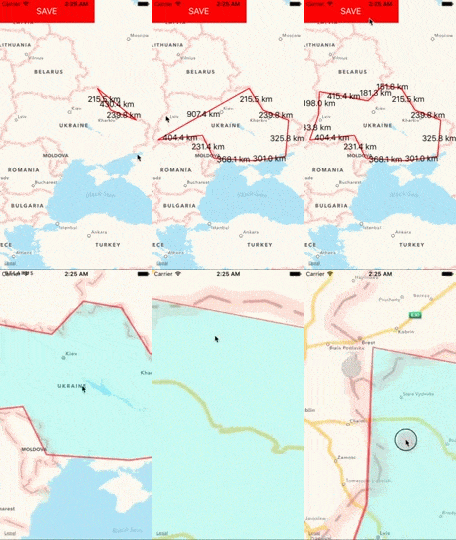
Of course, this doesn't fully solve the issue, because you would have to add pinch and pan gestures too, but I hope that I could point into the right direction.
101
If you love us? You can donate to us via Paypal or buy me a coffee so we can maintain and grow! Thank you!
Donate Us With

