Menu
Menu
I have a problem updating DataGridView from another thread. Let me explain. When user clicks a button on a form I need to populate the grid with some rows. This process takes some time, so I'm doing it in a separate thread. Before starting the thread I set DataGridView.Enabled property to false, to prevent user from editing items while they are being added, and just before the working thread ends I set Enabled back to true.
The problem is DataGridView won't update its contents correctly if scrollbars need to be shown. I'll illustrate this with a screenshot:
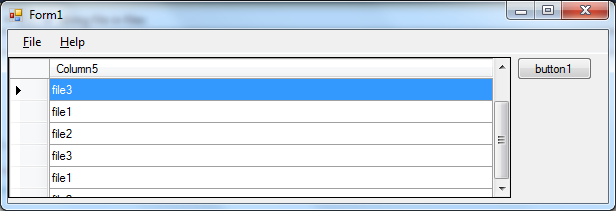
As you can see, the last visible row is partially drawn and the DataGridView won't scroll down. If I resize the grid, making it to repaint itself, all rows appear normally.
Here is some code:
    private void button1_Click(object sender, EventArgs e)
    {
        string[] fileNames = new string[] { "file1", "file2", "file3" };
        Thread AddFilesToListThread = new Thread(ThreadProcAddRowsToGrid);
        dataGridView1.Enabled = false;
        AddFilesToListThread.Start(fileNames);
    }

    delegate void EmptyDelegate();

    private void ThreadProcAddRowsToGrid(object fileNames)
    {
        string[] files = (string[])fileNames;
        foreach (string file in files)
        {
            EmptyDelegate func = delegate
            {
                dataGridView1.Rows.Add(file);
            };
            this.Invoke(func);
        }

        EmptyDelegate func1 = delegate
        {
            dataGridView1.Enabled = true;
        };
        this.BeginInvoke(func1);
    }
I've also notices that only Enabled property causes this strange behaviour. Changing, for example, BackgroundColor works fine.
Could you help me see where the problem is?
 524
524
Have you tried DataGridView.Refresh()
Maybe setting the readonly property instead of dataGridView1.Enabled = true;?
Alternatively, I think this may be solved by separating your data from the UI.
It looks to me like this is a simplified example for SO here but if you can I would suggest replacing the equivalent line;
dataGridView1.Rows.Add(file);
with
DataTable table = getData(); //In your snippet (file)
BindingSource source = new BindingSource();
source.DataSource = table
dataGridView1.Datasource = source;
Then you can also refresh the data using ResetBindings on the BindingSource;
table = getData();; //Update your data object
source.ResetBindings(false);
If you love us? You can donate to us via Paypal or buy me a coffee so we can maintain and grow! Thank you!
Donate Us With