 Menu
Menu
Warm greetings,
I'm using the below code to show an annotation on an iOS mkmapview when tapping on the map.
MKPointAnnotation *aAnnotationPoint = [[MKPointAnnotation alloc] init];

aAnnotationPoint.title = @"Virginia";
aAnnotationPoint.subtitle = @"This is a test code .this is a test code. This is a test codeThis is a test code .this is a test code. This is a test code";

// Add the annotationPoint to the map
[myMapView addAnnotation:aAnnotationPoint];
The problem is that the annotation is not displaying the text fully - it cuts it off with .... This is the result:
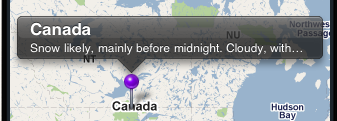
I have searched for this kind of sample over the internet but no with no luck. How can I accomplish this?
 340
340
By default the size of callout through MKPointAnnotation is the same as you had shown in the image. Due to a very long subtitle the subtitle text is not displaying fully.
A solution to this problem is to go for the custom callouts from here. Also try to take help from this wonderful tutorial where the UIBarButton and UIImageView is given to pinView.
Hope you got my point. Good Luck!
174
If you love us? You can donate to us via Paypal or buy me a coffee so we can maintain and grow! Thank you!
Donate Us With

