 Menu
Menu
So I have been writing a lot of image processing code lately using only core graphics and i have made quite a few working filters that manipulate the colors, apply blends, blurs and stuff like that. But I'm having trouble writing a filter to apply a pointillize effect to an image like this:
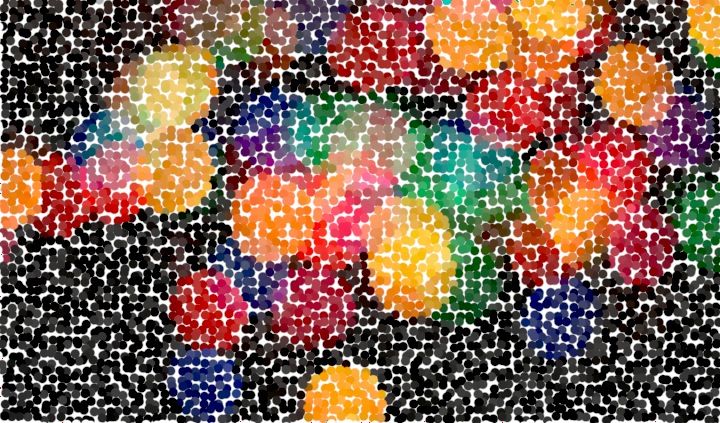
what I'm trying to do is get the color of a pixel and fill an ellipse with that color, looping through the image and doing this every few pixels here is the code:
EDIT: here is my new code this time its just drawing a few little circles in the bottom of the image am I doing it right like you said?
-(UIImage*)applyFilterWithAmount:(double)amount {

CGImageRef inImage = self.CGImage;
CFDataRef m_dataRef = CGDataProviderCopyData(CGImageGetDataProvider(inImage));
UInt8* m_pixelBuf = (UInt8*)CFDataGetBytePtr(m_dataRef);

int length = CFDataGetLength(m_dataRef);

CGContextRef ctx = CGBitmapContextCreate(m_pixelBuf,
                                    CGImageGetWidth(inImage),
                                    CGImageGetHeight(inImage),
                                    CGImageGetBitsPerComponent(inImage),
                                    CGImageGetBytesPerRow(inImage),
                                    CGImageGetColorSpace(inImage),
                                    CGImageGetBitmapInfo(inImage));

int row = 0;
int imageWidth = self.size.width;

if ((row%imageWidth)==0) {
    row++;
}

int col = row%imageWidth;

for (int i = 0; i<length; i+=4) {
    //filterPointillize(m_pixelBuf, i, context);

    int r = i;
    int g = i+1;
    int b = i+2;

    int red = m_pixelBuf[r];
    int green = m_pixelBuf[g];
    int blue = m_pixelBuf[b];

    CGContextSetRGBFillColor(ctx, red/255, green/255, blue/255, 1.0);
    CGContextFillEllipseInRect(ctx, CGRectMake(col, row, amount, amount));
}

CGImageRef imageRef = CGBitmapContextCreateImage(ctx);
CGContextRelease(ctx);
UIImage* finalImage = [UIImage imageWithCGImage:imageRef];
CGImageRelease(imageRef);
CFRelease(m_dataRef);
return finalImage;
}
 429
429
One problem I see right off the bat is you are using the raster cell number for both your X and Y origin. A raster in this configuration is just a single dimension line. It is up to you to calculate the second dimension based on the raster image's width. That could explain why you got a line.
Another thing: seems like you are reading every pixel of the image. Didn't you want to skip pixels that are the width of the the ellipses you are trying to draw?
Next thing that looks suspicious is I think you should create the context you are drawing in before drawing. In addition, you should not be calling:
CGContextRef contextRef = UIGraphicsGetCurrentContext();
CGContextSaveGState(contextRef);
and
CGContextRestoreGState(contextRef);
inside the loop.
EDIT:
One further observation: your read RGB values are 0-255, and the CGContextSetRGBFillColor function expects values to be between 0.f - 1.f. This would explain why you got white. So you need to divide by 255:
CGContextSetRGBFillColor(contextRef, red / 255, green / 255, blue / 255, 1.0);
If you have any further questions, please don't hesitate to ask!
EDIT 2:
To calculate the row, first declare a row counter outside the loop:
int row = 0; //declare before the loop

int imageWidth = self.size.width; //get the image width

if ((i % imageWidth) == 0) { //we divide the cell number and if the remainder is 0
                             //then we want to increment the row counter
    row++;
}
We can also use mod to calculate the current column:
int col = i % imageWidth; //divide i by the image width. the remainder is the col num
EDIT 3: You have to put this inside the for loop:
if ((row%imageWidth)==0) {
    row++;
}

int col = row%imageWidth;
Also, I forgot to mention before, to make the column and row 0 based (which is what you want) you will need to subtract 1 from the image size:
int imageWidth = self.size.width - 1;
If you love us? You can donate to us via Paypal or buy me a coffee so we can maintain and grow! Thank you!
Donate Us With

