Menu
Menu
I would like to achieve the below layout.

There are 6 panels. The 4 buttons at the top are one panel, and the 3 buttons at the right side of the image are also in one panel. Apart from those two there are 4 other panels as indicated by the borders. I tried the below code but displays everything in a scattered way.
mainPanel.add(topToolBarPanel,BorderLayout.PAGE_START);
mainPanel.add(lefsideToolBarPanel,BorderLayout.LINE_START);
mainPanel.add(descriptionPanel,BorderLayout.LEFT);
mainPanel.add(mapPanel,BorderLayout.CENTER);
mainPanel.add(propertiesPanel,BorderLayout.EAST);
mainPanel.add(tablePanel,BorderLayout.PAGE_END);
How can I achieve the design as shown in the image? I need all the panels to be arranged inside that mainPanel. I cannot use null layout though. Please advice.
After trashgod's answer :
    JPanel gridPanel =  new JPanel(new GridLayout(1, 0));
    gridPanel.add(jInternalFrame1);
    gridPanel.add(descriptionPanel);
    mainPanel.add(gridPanel, BorderLayout.LINE_START);
    mainPanel.add(topToolBarPanel,BorderLayout.PAGE_START);
    mainPanel.add(tablePanel,BorderLayout.PAGE_END);
    mainPanel.add(mapPanel,BorderLayout.CENTER);
    mainPanel.add(PropertiesPanel,BorderLayout.LINE_END);
What I get :

 524
524
Add lefsideToolBarPanel and descriptionPanel to a panel having GridLayout; add the new panel to the BorderLayout.
Panel p  new Panel(new GridLayout(1, 0));
p.add(lefsideToolBarPanel);
p.add(descriptionPanel);
//mainPanel.add(lefsideToolBarPanel, BorderLayout.LINE_START);
//mainPanel.add(descriptionPanel, BorderLayout.LEFT);
mainPanel.add(p, BorderLayout.LINE_START);
There is no BorderLayout.LEFT. See also A Visual Guide to Layout Managers.
Addendum: Your updated question shows elements of topToolBarPanel, which should be added to PAGE_START, rather than LINE_START.
//mainPanel.add(topToolBarPanel,BorderLayout.LINE_START);
mainPanel.add(topToolBarPanel,BorderLayout. PAGE_START);
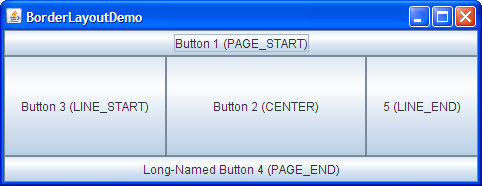
The width of the
propertiesPaneland height of thetablePanelneed to be increased. I usedsetSize()…
For the propertiesPanel, you can override getPreferredSize(), as discussed here. For the tablePanel, override getPreferredScrollableViewportSize() to customize the size of the table's enclosing JScrollPane, for example.
106
If you love us? You can donate to us via Paypal or buy me a coffee so we can maintain and grow! Thank you!
Donate Us With