Menu
Menu
I got a custom WPF property class named "RFPGegevens"
public class RFPGegevens
{
    private string _klant;
    public String Klant
    {
        get { return _klant; }
        set { _klant = value; }
    }
 }
In my ViewModel I got a property RFPGegevens
    private RFPGegevens _rfpGegevens;

    public RFPGegevens RfpGegevens
    {
        get
        {
            if (_rfpGegevens == null)
                _rfpGegevens = new RFPGegevens();
            return _rfpGegevens;
        }
        set
        {
            _rfpGegevens = value;
            base.RaisePropertyChangedEvent("RfpGegevens");
        }
    }
This property is filled correctly, if I debug this is the result:
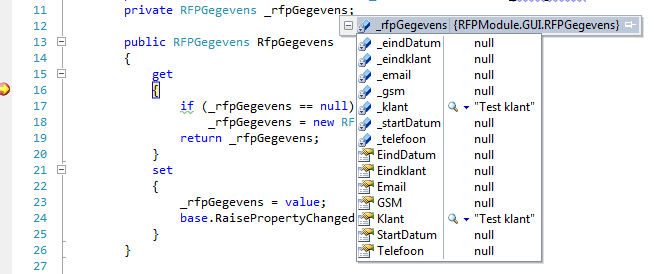
In my View I'm binding the property "RFPGegevens" to the datacontext of my Grid
<Grid DataContext="{Binding RfpGegevens}">
and still if I debug the "Klant" property field is filled.
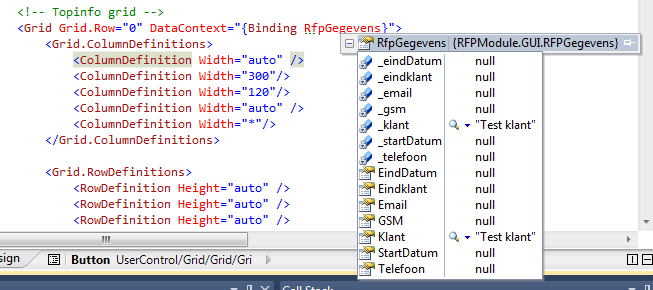
But as I bind this property in the View my textbox is still empty.
<TextBox Text="{Binding Klant, Mode=TwoWay}"/>
I also tried this but nothings seems to work:
<TextBox Text="{Binding RFPGegevens.Klant, Mode=TwoWay}"/>
Don't know what I'm doing wrong.
Thanks in advance ;)
 985
985
try with two things
<TextBox Text="{Binding Klant, Mode=TwoWay, UpdateSourceTrigger=PropertyChanged}"/>
public class RFPGegevens
{
    private string _klant;
    public String Klant
    {
        get { return _klant; }
        set {
              _klant = value;
              //Raise the property changed event here
            }
    }
 }
If you love us? You can donate to us via Paypal or buy me a coffee so we can maintain and grow! Thank you!
Donate Us With