 Menu
Menu
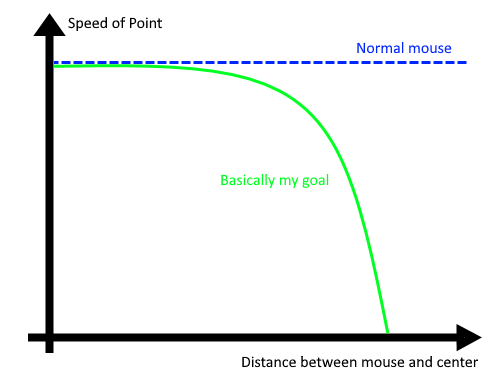
I want a point to move towards the mouse position. Currently the point just is the mouse location. But I want it so that the bigger the distance between mouse and center of the screen, the less force get´s added to the point. So if the mouse is enough distance away from the center, the point will just stop moving further outwards because it´s force away from the center is to small. The center should always be the point which is looked at. So no repositioning.
I am really stuck here because I am pretty young and I didn´t have had vector calculation in school (I think this is what you need here). I have no idea how to do what I am trying to archive. The only thing I tried was using the distance between center and mouse (Math.hypot(width / 2 - mouseX , height / 2 - mouseY)). But it didn´t work.
This is my minimal reproducible example:
import javax.swing.*;
import java.awt.*;

public class Example extends JPanel {
    private static final int size = 500;

public Example() {
    this.setPreferredSize(new Dimension(size, size));
}

@Override
protected void paintComponent(Graphics g) {
    super.paintComponent(g);
    Graphics2D g2d = (Graphics2D) g.create();
    g2d.fillOval(getWidth() / 2 - 3, getHeight() / 2 - 3, 6, 6); // center
    Point point = MouseInfo.getPointerInfo().getLocation();
    SwingUtilities.convertPointFromScreen(point, this);
    // Do calculations with the point here
    g2d.fillOval(point.x - 5, point.y - 5, 10, 10);
    repaint();
}

private static void createFrame() {
    JFrame f = new JFrame();
    f.setDefaultCloseOperation(JFrame.EXIT_ON_CLOSE);
    f.add(new Example());
    f.pack();
    f.setVisible(true);
}

    public static void main(String[] args) {
        EventQueue.invokeLater(Example::createFrame);
    }
}
It would look like this:
 348
348
 asked Jun 10 '26 08:06
You can declare an attraction ratio value, which will strech the circle to the center of the screen, based on its value. You need also be able to know for each cursor position how far it is from the center in percentages.
import javax.swing.*;
import java.awt.*;

public class Example extends JPanel {
    private static final int SIZE = 500;
    private static final int CENTER_CIRCLE_RADIUS = 3;
    private static final int CIRCLE_RADIUS = 5;
    private static final double ATTRACTION_RATIO = 0.75;

    public Example() {
        this.setPreferredSize(new Dimension(SIZE, SIZE));
    }

    @Override
    protected void paintComponent(Graphics g) {
        super.paintComponent(g);
        Graphics2D g2d = (Graphics2D) g.create();
        final int xCenterPoint = getWidth() / 2;
        final int yCenterPoint = getHeight() / 2;

        g2d.fillOval(xCenterPoint - CENTER_CIRCLE_RADIUS, yCenterPoint - CENTER_CIRCLE_RADIUS,
                CENTER_CIRCLE_RADIUS * 2, CENTER_CIRCLE_RADIUS * 2); // center
        Point point = MouseInfo.getPointerInfo().getLocation();
        SwingUtilities.convertPointFromScreen(point, this);

        final double xNearToCenter = 1 - ((double) (xCenterPoint - point.x) / xCenterPoint);
        final double yNearToCenter = 1 - ((double) (yCenterPoint - point.y) / yCenterPoint);

        g2d.fillOval((int) (xCenterPoint * (ATTRACTION_RATIO + xNearToCenter * (1 - ATTRACTION_RATIO))),
                (int) (yCenterPoint * (ATTRACTION_RATIO + yNearToCenter * (1 - ATTRACTION_RATIO))),
                CIRCLE_RADIUS * 2, CIRCLE_RADIUS * 2);

        repaint();
    }

    private static void createFrame() {
        JFrame f = new JFrame();
        f.setDefaultCloseOperation(JFrame.EXIT_ON_CLOSE);
        Example panel = new Example();
        f.add(panel);
        f.pack();
        f.setVisible(true);
    }

    public static void main(String[] args) {
        EventQueue.invokeLater(Example::createFrame);
    }
}
If you love us? You can donate to us via Paypal or buy me a coffee so we can maintain and grow! Thank you!
Donate Us With
